Override Elements with Revit API (SetElementOverrides)
Override Graphics
To override graphics with Revit API we need to use .SetElementOverrides(element_id, settings) that is located inside of View Class. It's not a complicated method but it has a lot of methods that you might need to use to create Override Settings that you want to apply to Elements.
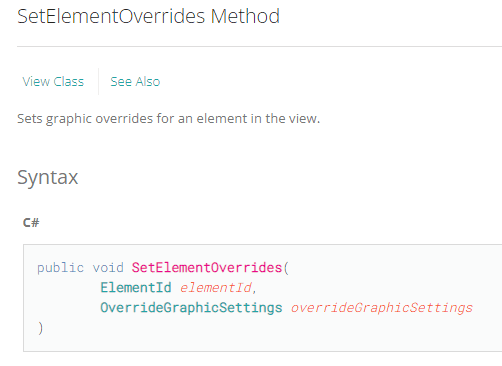
As you can see we just need to provide ElementId and OverrideGraphicsSettings
OverrideGraphicSettings
First of all we need to create OverrideGraphicsSettings and then we can start modifying it.
settings = OverrideGraphicSettigns()There are a lot of different methods for OverrideGraphicsSettings, but yet it's quite simple to use them.
Just think of the menu in Revit UI where you manually have to assign all of the overrides.
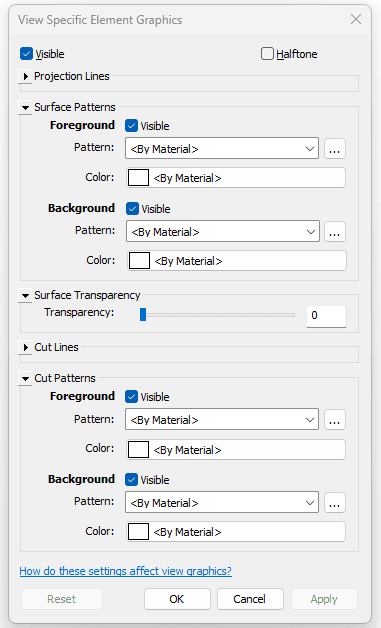
You will find methods in Revit API Documentation for each of the controls you have in that UI menu.
👇 Check them out here
OverrideGraphicSettings Methods
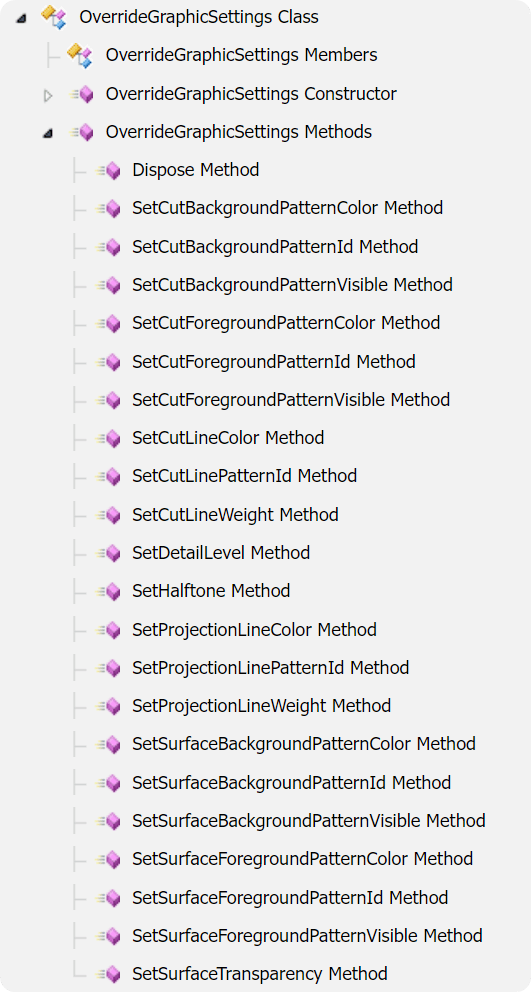
How to use OverrideGraphicSettings Methods?
By looking at each method you can see arguments that you need to provide. It can be Color, LinePattern, FillPatternElement…
👇 Here is a simple snippet to get everything we need and only change Surface Color of the elements.
#⬇️ IMPORTS
from Autodesk.Revit.DB import *
#📦 Variables
view = doc.ActiveView
walls_in_view = FilteredElementCollector(doc, doc.ActiveView.Id) \
.OfCategory(BuiltInCategory.OST_Walls) \
.WhereElementIsNotElementType() \
.ToElements()
#🎨 Create a Color
color = Color(255, 255, 0)
#⚙️ Create Override Graphic Settings
override_settings = OverrideGraphicSettings()
#⚙️ Apply new Graphic Setting
override_settings.SetSurfaceForegroundPatternColor(color)
#🖌️ Override Elements
with Transaction(doc, 'Transaction Name') as t:
t.Start()
for wall in walls_in_view:
view.SetElementOverrides(wall.Id, override_settings )
t.Commit()Modify to your needs
The snippet above shows you the principle, but it will do just fine to start with. Then go through RevitAPI Documentation and look for methods that you most likely want to use.
I prepared another snippet for you where you can see more examples:
#⬇️ IMPORTS
from Autodesk.Revit.DB import *
#📦 Variables
doc = __revit__.ActiveUIDocument.Document
view = doc.ActiveView
walls_in_view = FilteredElementCollector(doc, doc.ActiveView.Id) \
.OfCategory(BuiltInCategory.OST_Walls) \
.WhereElementIsNotElementType() \
.ToElements()
#🎨 COLORS
color_yellow = Color(255,255,0)
color_red = Color(255,0,0)
color_blue = Color(0,0,255)
#🧱 GET PATTERNS
all_patterns = FilteredElementCollector(doc).OfClass(FillPatternElement).ToElements()
solid_pattern = [i for i in all_patterns if i.GetFillPattern().IsSolidFill][0]
#〰️ LINES
line_patterns = FilteredElementCollector(doc).OfClass(LinePatternElement).ToElements()
random_line_pattern = line_patterns[0]
lineweight = 5
#⚙️ CREATE OVERRIDE SETTINGS
override_settings = OverrideGraphicSettings()
#⚙️ SURFACE FOREGROUND (PATTERN + COLOR)
override_settings.SetSurfaceForegroundPatternId(solid_pattern.Id)
override_settings.SetSurfaceForegroundPatternColor(color_yellow)
#⚙️ CUT FOREGROUND ( PATTERN + COLOR)
override_settings.SetCutForegroundPatternId(solid_pattern.Id)
override_settings.SetCutForegroundPatternColor(color_yellow)
#⚙️ PROJECTION LINES (Extra)
override_settings.SetProjectionLineColor(color_red)
override_settings.SetProjectionLinePatternId(random_line_pattern.Id)
override_settings.SetProjectionLineWeight(lineweight)
#⚙️ CUT LINES (Extra)
override_settings.SetCutLineColor(color_red)
override_settings.SetCutLinePatternId(random_line_pattern.Id)
override_settings.SetCutLineWeight(lineweight)
#⚙️ SET TRANSPARENCY
override_settings.SetSurfaceTransparency(50)
#🎯 MAIN
with Transaction(doc, 'Override Colours') as t:
t.Start()
#👉 OVERRIDE ELEMENT GRAPHICS IN ACTIVE VIEW
for wall in walls_in_view:
view.SetElementOverrides(wall.Id, override_settings)
t.Commit()
__author__ = '🙋♂️ Erik Frits'Match Graphic Overrides
This is even easier. To match Graphic Overrides from another element we just need to get OverrideGraphicsSettings and apply it to another element with or without modifying it.
# ⬇️ IMPORTS
from Autodesk.Revit.DB import *
from pyrevit.revit import pick_element
#📦 Variables
doc = __revit__.ActiveUIDocument.Document
view = doc.ActiveView
element = pick_element()
#⚙️ Get Graphics
graphics = view.GetElementOverrides(element.Id)
#👉 Pick elements to match Overrides.
match_element = pick_element()
#🎯 Match Graphics
with Transaction(doc, 'Match') as t:
t.Start()
view.SetElementOverrides(elem.Id, graphics)
t.Commit()