Revit API: How to change associated Level in Walls?
Get Parameters
First of all we need to have an element that we are going to modify. I am going to get a wall with an ElementId
Then we need to look inside and find parameters that we want to modify. You can do it easily with RevitLookup plugin that let's us Snoop Current Selection
a\
Then if you click on Definition you can see BuiltInName of this Parameter. Which is - WALL_BASE_CONSTRAINT
Then do the same to find names of Top Constraint parameter and Unconnected Height
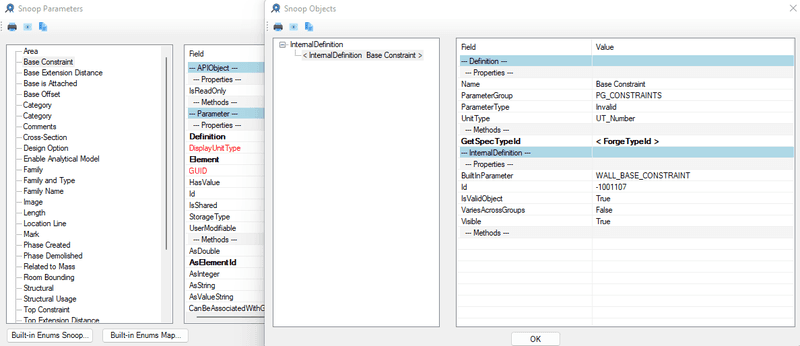
Since these are BuiltInParamteres we can get them with .get_Parameter() method\
# Get Wall
wall = doc.GetElement(ElementId(346574))
# Get Wall Parameters
wall_base = wall.get_Parameter(BuiltInParameter.WALL_BASE_CONSTRAINT)
wall_top = wall.get_Parameter(BuiltInParameter.WALL_HEIGHT_TYPE)
wall_height = wall.get_Parameter(BuiltInParameter.WALL_USER_HEIGHT_PARAM)Set New Levels
To set new levels we just going to take parameter variables we have written already and use .Set() method and provide ElementId of new levels.
# Choose New Levels
new_base_level = lvls[2] # I am taking random level
new_top_level = lvls[3] # I am taking random level
# Set New Associated Levels
wall_base.Set(new_base_level.Id) # Set Base
wall_top.Set(new_top_level.Id) # Set TopSet Wall Top Constraint to None
If you want to change Top Constraint to None we need to provide ElementId(-1) instead of Level.Id This is equivalent to None in Revit API.
# SET TOP: Unconnected Height
wall_top.Set(ElementId(-1)) # Set Top: None
wall_height.Set(20) # Set Unconnected Height (20 feet)Final Code:
# -*- coding: utf-8 -*-
# Author: Erik Frits
from Autodesk.Revit.DB import *
# ╦ ╦╔═╗╦═╗╦╔═╗╔╗ ╦ ╔═╗╔═╗
# ╚╗╔╝╠═╣╠╦╝║╠═╣╠╩╗║ ║╣ ╚═╗
# ╚╝ ╩ ╩╩╚═╩╩ ╩╚═╝╩═╝╚═╝╚═╝
#====================================================================================================
doc = __revit__.ActiveUIDocument.Document
uidoc = __revit__.ActiveUIDocument
app = __revit__.Application
# ╔╦╗╔═╗╦╔╗╔
# ║║║╠═╣║║║║
# ╩ ╩╩ ╩╩╝╚╝ MAIN
#====================================================================================================
# Get Levels
lvls = FilteredElementCollector(doc).OfCategory(BuiltInCategory.OST_Levels)\
.WhereElementIsNotElementType().ToElements()
# Create Transaction to make changes in the project.
with Transaction(doc,__title__) as t:
t.Start()
# Get Wall
wall = doc.GetElement(ElementId(346574))
# Get Wall Parameters
wall_base = wall.get_Parameter(BuiltInParameter.WALL_BASE_CONSTRAINT)
wall_top = wall.get_Parameter(BuiltInParameter.WALL_HEIGHT_TYPE)
wall_height = wall.get_Parameter(BuiltInParameter.WALL_USER_HEIGHT_PARAM)
# Choose New Levels
new_base_level = lvls[2] # I am taking random level
new_top_level = lvls[3] # I am taking random level
# Set New Associated Levels
wall_base.Set(new_base_level.Id) # Set Base
wall_top.Set(new_top_level.Id) # Set Top
# SET TOP: Unconnected Height
wall_top.Set(ElementId(-1)) # Set Top: None
wall_height.Set(20) # Set Unconnected Height (20 feet)
t.Commit()
# Author: Erik Frits