How To Get Material Layers from Wall, Floors and Roofs
How to Get Material Layers?
Since you are here, probably you are wondering:
"How do you get Material Layers of our WallType, FloorType, RoofType and CeilingType?".
Well, I'm glad you asked!
I will explain everything on an example of WallTypes, and the similar logic will apply to other elements.
First of all, let's think of Revit UI functionality to access this information.
💡Brainstorming
You can use Revit Lookup to inspect your elements until you find layers. You can follow this path:Wall -> WallType -> GetCompoundStructure -> GetLayers -> MaterialId
Overall it's not complicated, but let's explore a few details.
💡Here is the pyRevit Template I will begin with.
# -*- coding: utf-8 -*-
__title__ = "Read Wall Layers"
__doc__ = """Version = 1.0
Date = 25.01.2024
_____________________________________________________________________
Description:
Learn How to Get Material Layers?
_____________________________________________________________________
Author: Erik Frits"""
#⬇️ Imports
from Autodesk.Revit.DB import *
#📦 Variables
doc = __revit__.ActiveUIDocument.Document #type: Document
uidoc = __revit__.ActiveUIDocument
app = __revit__.Application1️⃣Select Elements
First of all we need some Wall elements. You probably already have a code snippet where you get them, but I will leave a snippet for others to use:
from Autodesk.Revit.UI.Selection import Selection, ObjectType
selection = uidoc.Selection #type: Selection
#👉 Get Current Selection
selected_el_ids = selection.GetElementIds()
selected_el = [doc.GetElement(e_id) for e_id in selected_el_ids]
#👉 Prompt User Selection if nothing selected
if not selected_el:
selected_el_refs = selection.PickObjects(ObjectType.Element)
selected_el = [doc.GetElement(ref) for ref in selected_el_refs]
#👀 Filter Elements
selected_walls = [el for el in selected_el if type(el) == Wall]
#❗ Ensure Walls Selected
if not selected_walls:
from pyrevit import forms
forms.alert('No walls selected. Please try again', exitscript=True)Here is a simple Snippet to get user selection.
1️⃣ First of all we try to get current user's selection
2️⃣ Then if nothing is selecte, we will prompt PickObjects selection
3️⃣ Since we only want to work with Walls, let's make a simple filter.
4️⃣ Lastly, let's give a warning if user hasn't selected any walls.
2️⃣Get Layers
Now once we have Walls, we can start looking inside of them. I would recommend you to use Revit Lookup and look inside until you find Layers. Then it becomes very easy to follow the same logic in your code.
As I've mentioned earlier, we need to look in WallType to get material layers.
There will be .GetCompoundStructure method that returns CompoundStructure.
Then we can use GetLayers to get all material layers. Keep in mind it returns List<CompoundStructureLayer>. So you can look in the Revit API Documentation what else we can get from them.
for wall in selected_walls:
wall_type = wall.WallType
wall_type_name = Element.Name.GetValue(wall_type)
structure = wall_type.GetCompoundStructure() #type: CompoundStructure
layers = structure.GetLayers() #type: List[CompoundStructureLayer]3️⃣Read Material
Now we have all layers, we can read their properties.
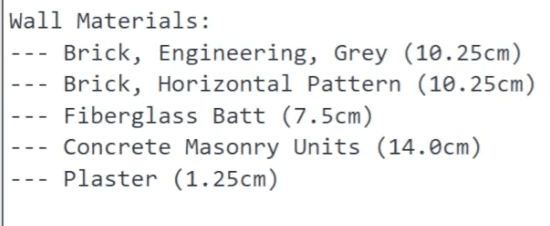
In my case, I want to read Material Names and Thicknesses of each layer and print in the console.
It might be used later for renaming our types 😉.
Here is the code snippet:
print('Wall Materials:')
for lay in layers:
mat_id = lay.MaterialId
width_ft = lay.Width #❗ Revit API USES FEET!
width_cm = width_ft * 30.48
if mat_id == ElementId(-1): #👀 ElementId(-1) Means None
mat_name = 'None
else:
mat = doc.GetElement(mat_id)
mat_name = mat.Name
print('--- {} ({}cm)'.format(mat_name, width_cm))Keep in mind that some layers have no material assigned to them, so they will return ElementId(-1). So don't forget to make an if statement before you try to get Material by using doc.GetElement(e_id)
💡Also will notice that I multiplied my width with 30.48 for rounding.
You can use a better approach for rounding using UnitUtils Class.
width_cm = UnitUtils.ConvertFromInternalUnits(width_ft, UnitTypeId.Centimeters)✨Final Code
Here is the Final Code. And you will find the screenshot example on the bottom ;)
# -*- coding: utf-8 -*-
__title__ = "Read Properties"
__doc__ = """Version = 1.0
Date = 15.01.2024
_____________________________________________________________________
Description:
How to Read Properties and Methods from Elements?
_____________________________________________________________________
Author: Erik Frits"""
# ╦╔╦╗╔═╗╔═╗╦═╗╔╦╗╔═╗
# ║║║║╠═╝║ ║╠╦╝ ║ ╚═╗
# ╩╩ ╩╩ ╚═╝╩╚═ ╩ ╚═╝ IMPORTS
# ==================================================
# Regular + Autodesk
from Autodesk.Revit.DB import *
# ╦ ╦╔═╗╦═╗╦╔═╗╔╗ ╦ ╔═╗╔═╗
# ╚╗╔╝╠═╣╠╦╝║╠═╣╠╩╗║ ║╣ ╚═╗
# ╚╝ ╩ ╩╩╚═╩╩ ╩╚═╝╩═╝╚═╝╚═╝ VARIABLES
# ==================================================
doc = __revit__.ActiveUIDocument.Document #type: Document
uidoc = __revit__.ActiveUIDocument
app = __revit__.Application
# ╔╦╗╔═╗╦╔╗╔
# ║║║╠═╣║║║║
# ╩ ╩╩ ╩╩╝╚╝ MAIN
# ==================================================
from Autodesk.Revit.UI.Selection import Selection, ObjectType
selection = uidoc.Selection #type: Selection
# Get Current Selection
selected_el_ids = selection.GetElementIds()
selected_el = [doc.GetElement(e_id) for e_id in selected_el_ids]
# Prompt User Selection if nothing selected
if not selected_el:
selected_el_refs = selection.PickObjects(ObjectType.Element)
selected_el = [doc.GetElement(ref) for ref in selected_el_refs]
# Filter Elements
selected_walls = [el for el in selected_el if type(el) == Wall]
if not selected_walls:
from pyrevit import forms
forms.alert('No walls selected. Please try again', exitscript=True)
#👀 READ PROPERTIES
for wall in selected_walls:
lvl = doc.GetElement(wall.LevelId)
wall_type = wall.WallType
wall_type_name = Element.Name.GetValue(wall_type)
print('-'*50)
print('Wall Id: {}'.format(wall.Id))
print('WallType: {}'.format(wall_type_name))
print('Level Name: {}'.format(lvl.Name))
structure = wall_type.GetCompoundStructure()
layers = structure.GetLayers()
print('Wall Materials:')
for lay in layers:
mat_id = lay.MaterialId
width_ft = lay.Width # Revit API USES FEET!
width_cm = width_ft * 30.48
if mat_id != ElementId(-1):
mat = doc.GetElement(mat_id)
mat_name = mat.Name
else:
mat_name = 'None'
print('--- {} ({}cm)'.format(mat_name, width_cm))