Find Intersecting Rooms and Areas
Intro
I was asked how to find related Rooms and Areas in Revit project to exchange some parameters?
Check this example to better understand it.
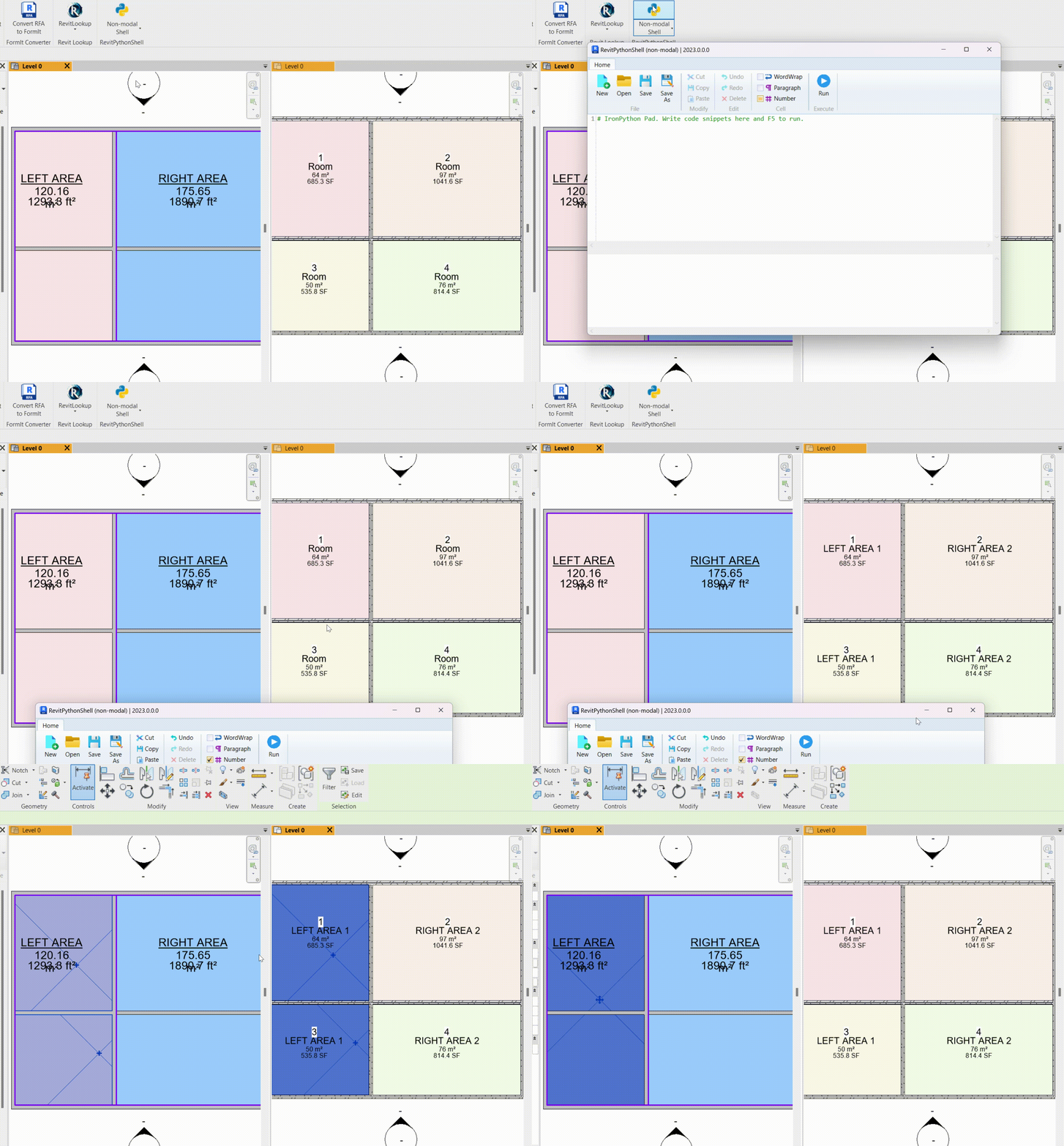
In this example I find intersecting rooms and areas and I write Area.Name to Room.Name. Obviously, you would want to write it to another parameter, but it's great as an example.
It's not possible to do in Revit by default, but if you happen to know some python and Revit API, then you can do that.
Brainstorming
Unfortunately, Areas don't have any methods to check if point is inside of them like room.IsPointInRoom… But we can find a workaround!
👇 Here are the steps that I will do, to make it happen :
Get All Rooms
Get All Areas
Sort Areas by Type
Iterate through Areas
Get Area Boundary
Build a Solid Geometry from Boundary (Extrusion)
Iterate through Rooms
Create a fake little Line
Check Intersection between Geometry and Line
Write Parameters to Room if True
Overall it's quite a simple script. But if you are new to working with Geometry and Intersection, then there is a tricky part!
But I got you 😉
Get Rooms and Sorted Areas
Firstly, let's get our rooms and areas. However, keep in mind that we can have a lot of different Areas with different AreaSchemes placed in the same place! And that can be an issue if we don't choose a specific one. So therefore, we need to filter only 1 type of areas to check room intersection.
Here is how to do it:
from collections import defaultdict
#👉 Get Rooms & Areas
rooms = FilteredElementCollector(doc).OfCategory(BuiltInCategory.OST_Rooms).WhereElementIsNotElementType().ToElements()
all_areas = FilteredElementCollector(doc).OfCategory(BuiltInCategory.OST_Areas).WhereElementIsNotElementType().ToElements()
#🔎 Sort Areas by AreaScheme
dict_areas = defaultdict(list) # List will be default value for new keys!
for area in all_areas:
dict_areas[area.AreaScheme.Name].append(area)💡 Lastly, you need to select areas with which AreaScheme to use.
Since I use pyRevit I will use SelectFromList form to ask user to select one of AreaSchemes.
from pyrevit import forms
#👉 Select AreaScheme
sel_area_scheme = forms.SelectFromList.show(dict_areas.keys(), button_name='Select AreaScheme')
if not sel_area_scheme:
forms.alert('No AreaScheme was selected. Please Try Again')
areas = dict_areas[sel_area_scheme]Get Area Solid Geometry
Unfortunately, we can't directly get Area 3D Geometry, because it's a 2D object… However, we can get its boundaries. And once we have boundaries we can easily create an extruded solid by using GeometryCreationUtilities .CreateExtrusionGeometry. Also keep in mind that I will use a random height (10ft = ~3m) for creating a 3D representation of my Area 3D Boxes.
I will make it as a function, so you can easily adjust and reuse it.
#📦 Function to create a solid from an Area
def create_area_solid(area):
area_boundary = area.GetBoundarySegments(SpatialElementBoundaryOptions())
if area_boundary:
if len(area_boundary) == 0:
return None
profile = CurveLoop()
for curve in area_boundary[0]: # First loop is the outer boundary
profile.Append(curve.GetCurve())
extrusion_height = 10.0 #⚠️ Random Height in Feet! ~3m
return GeometryCreationUtilities.CreateExtrusionGeometry([profile], XYZ.BasisZ, extrusion_height)
Here is how to use this function to get Area Solids.
for area in areas:
try:
area_solid = create_area_solid(area)
except:
# ⚠️ Print Error Message if Fails
import traceback
print(traceback.format_exc())
💡I've added Try/Except so we can handle errors better.
Find Intersecting Rooms
By now we have Area 3D Boxes geometry, and we can easily get Room.Location.Point.
Now we need to check if we room's point is actually intersecting with the geometry. I haven't seen a method to check if point intersects the geometry. However, there is a method Solid.IntersectWithCurve (tricky to use this one!).
To use this method, we will need to convert our point into a tiny line with fraction of a length and use it for intersecting. Then we will get intersection segments, and we can check if them if IsAlmostEqualTo.
#✂️ Function to check if point is inside a solid
def is_point_inside_solid(point, solid):
# Create a tiny line from Point
line = Line.CreateBound(point, XYZ(point.X, point.Y, point.Z + 0.01)) # Create Tiny Line
tolerance = 0.00001
# Create Intersection Options
opts = SolidCurveIntersectionOptions()
opts.ResultType = SolidCurveIntersectionMode.CurveSegmentsInside
# Intersect Line with Geometry
sci = solid.IntersectWithCurve(line, opts)
for i,x in enumerate(sci):
curve = sci.GetCurveSegment(i)
pt_start = curve.GetEndPoint(0)
pt_end = curve.GetEndPoint(1)
if point.IsAlmostEqualTo(pt_start, tolerance) or point.IsAlmostEqualTo(pt_end, tolerance):
return True
Now we have everything we need to check if Rooms and Areas intersect and then do something. In my case I will just write Area.Name to Room.Name, so it's obvious that we got the correct match. But feel free to modify what should happen.
Here is how to check that:
#🔓 Start transaction to modify the document
t = Transaction(doc, "Update Rooms")
t.Start()
for area in areas:
try:
area_solid = create_area_solid(area)
if area_solid:
for room in rooms:
room_point = room.Location.Point
if is_point_inside_solid(room_point, area_solid):
room.Name = Element.Name.GetValue(area) #Abstract Example
#👇 Write something to a Parameter...
# value = area.Name
# room.LookupParameter("SharedParamName").Set(value)
except:
# ⚠️ Print Error Message if Fails
import traceback
print(traceback.format_exc())
t.Commit() #🔒💡 Don't forget to add Transaction for Changes 😉
Final Code + Results
😉 Here is the final result put together.
# -*- coding: utf-8 -*-
__title__ = "Find Intersecting Rooms&Areas"
__doc__ = """Date = 18.04.2024
__________________________
Description:
Find Intersecting Rooms&Areas and write Area.Name to Room.Name
(Adjust to your own needs)
_____________________________________________________________________
How-To:
- Run the Tool
- Select AreaScheme of desired Areas
_____________________________________________________________________
Author: Erik Frits"""
# ╦╔╦╗╔═╗╔═╗╦═╗╔╦╗╔═╗
# ║║║║╠═╝║ ║╠╦╝ ║ ╚═╗
# ╩╩ ╩╩ ╚═╝╩╚═ ╩ ╚═╝ IMPORTS
#==================================================
from Autodesk.Revit.DB import *
from Autodesk.Revit.DB.Architecture import Room
from pyrevit import forms
# ╦ ╦╔═╗╦═╗╦╔═╗╔╗ ╦ ╔═╗╔═╗
# ╚╗╔╝╠═╣╠╦╝║╠═╣╠╩╗║ ║╣ ╚═╗
# ╚╝ ╩ ╩╩╚═╩╩ ╩╚═╝╩═╝╚═╝╚═╝
#==================================================
uidoc = __revit__.ActiveUIDocument
doc = __revit__.ActiveUIDocument.Document
# ╔═╗╦ ╦╔╗╔╔═╗╔╦╗╦╔═╗╔╗╔╔═╗
# ╠╣ ║ ║║║║║ ║ ║║ ║║║║╚═╗
# ╚ ╚═╝╝╚╝╚═╝ ╩ ╩╚═╝╝╚╝╚═╝
#_____________________________________________________________________
# 📦 Function to create a solid from an Area
def create_area_solid(area):
area_boundary = area.GetBoundarySegments(SpatialElementBoundaryOptions())
if area_boundary:
if len(area_boundary) == 0:
return None
profile = CurveLoop()
for curve in area_boundary[0]: # First loop is the outer boundary
profile.Append(curve.GetCurve())
extrusion_height = 10.0 # ⚠️ Random Height in Feet! ~3m
return GeometryCreationUtilities.CreateExtrusionGeometry([profile], XYZ.BasisZ, extrusion_height)
#✂️ Function to check if point is inside a solid
def is_point_inside_solid(point, solid):
# Create a tiny line from Point
line = Line.CreateBound(point, XYZ(point.X, point.Y, point.Z + 0.01)) # Create Tiny Line
tolerance = 0.00001
# Create Intersection Options
opts = SolidCurveIntersectionOptions()
opts.ResultType = SolidCurveIntersectionMode.CurveSegmentsInside
# Intersect Line with Geometry
sci = solid.IntersectWithCurve(line, opts)
for i,x in enumerate(sci):
curve = sci.GetCurveSegment(i)
pt_start = curve.GetEndPoint(0)
pt_end = curve.GetEndPoint(1)
if point.IsAlmostEqualTo(pt_start, tolerance) or point.IsAlmostEqualTo(pt_end, tolerance):
return True
# ╔╦╗╔═╗╦╔╗╔
# ║║║╠═╣║║║║
# ╩ ╩╩ ╩╩╝╚╝
#_____________________________________________________________________
from collections import defaultdict
#👉 Get Rooms & Areas
rooms = FilteredElementCollector(doc).OfCategory(BuiltInCategory.OST_Rooms).WhereElementIsNotElementType().ToElements()
all_areas = FilteredElementCollector(doc).OfCategory(BuiltInCategory.OST_Areas).WhereElementIsNotElementType().ToElements()
#🔎 Sort Areas by AreaScheme
dict_areas = defaultdict(list) # List will be default value for new keys!
for area in all_areas:
dict_areas[area.AreaScheme.Name].append(area)
#_____________________________________________________________________
from pyrevit import forms
# 👉 Select AreaScheme
sel_area_scheme = forms.SelectFromList.show(dict_areas.keys(), button_name='Select AreaScheme')
if not sel_area_scheme:
forms.alert('No AreaScheme was selected. Please Try Again')
areas = dict_areas[sel_area_scheme]
#_____________________________________________________________________
#🔓 Start transaction to modify the document
t = Transaction(doc, "Update Rooms")
t.Start()
for area in areas:
try:
area_solid = create_area_solid(area)
if area_solid:
for room in rooms:
room_point = room.Location.Point
if is_point_inside_solid(room_point, area_solid):
room.Name = Element.Name.GetValue(area) #Abstract Example
#👇 Write something to a Parameter...
# value = area.Name
# room.LookupParameter("SharedParamName").Set(value)
except:
# ⚠️ Print Error Message if Fails
import traceback
print(traceback.format_exc())
t.Commit() #🔒Result: